
Semantics
Header Tags
Section titled “Header Tags”A proper hierarchy of semantic tags should be present in each page. i.e. Only a single <h1> tag must be present on each page. All other headings should be a combination of the remaining heading tags according to hierarchy. Also note that improper hierarchy, like an <h2> tag nested inside an <h3> tag may introduce problems during indexing.
Proper hierarchy :
<h1>Main Header</h1><!-- A single h1 tag --><h2>Sub header</h2>
<div class="card">  <h3>Card Title</h3>  <p>Card description</p></div>
Improper hierarchy:
<h1>Main Header</h1><h1>Sub Header</h1><!-- Multiple h1 tags -->
<div class="card">  <h3>Card Title</h3>  <div class="sub-header">    <h2>Card sub-heading</h2>    <!-- h2 tag after h3 tag -->  </div></div>
There are numerous browser extensions that help in identifying the heading tag hierarchy in each page.
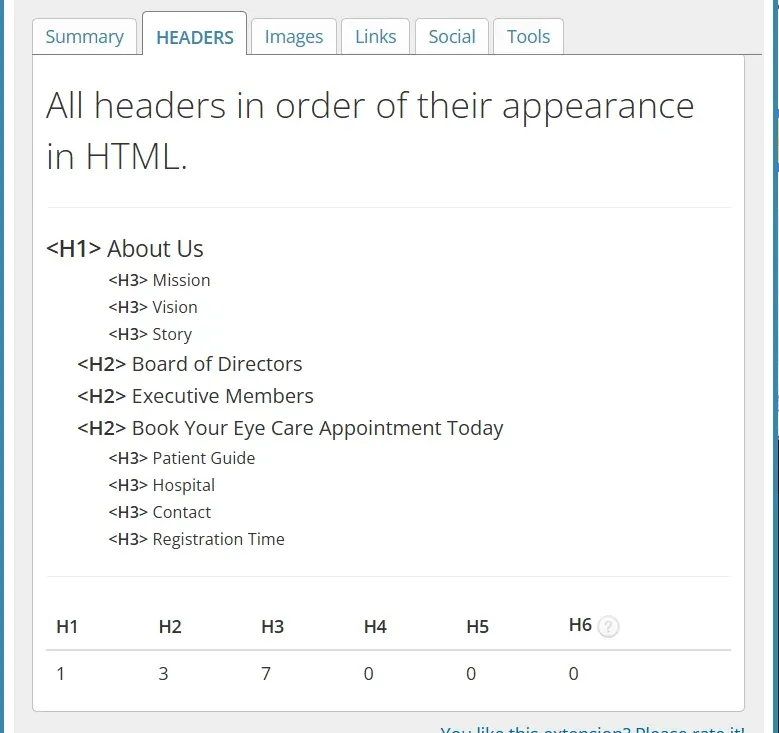
Title and Meta tags
Section titled “Title and Meta tags”There should be a <title> tag for each page. The title must be of appropriate length (not too short but not too long). A good practice is to include the site-name after the title for every page. e.g. “About Us | Find out more - NavaDristi”.
Appropriate <meta> tags should also be present in pages. They provide “metadata,” which is invisible data that describes the page’s content to search engines, web browsers, and social media platforms. These tags are usually present inside the <head> tag.
Code example:
<head> <meta charset="UTF-8" /> <meta name="viewport" content="width=device-width, initial-scale=1.0" /> <title>Page Title</title></head>Image “alt” attributes
Section titled “Image “alt” attributes”Every image tag must have an appropriate alt attribute attatched to it. Alt attributes serve as a “descriptor” of images and will show up when an image fails to load.
Code example:
<img src="./Cat.jpg" alt="Image of a brown Cat" />Descriptive anchor tags
Section titled “Descriptive anchor tags”Although not always possible, it is highly encouraged to have descriptive anchor tags or hyperlinks.
Non-descriptive:
<a href="site.com">Learn More</a>Descriptive:
<a href="site.com">Learn More about this service</a>Canonical URLs
Section titled “Canonical URLs”Canonical URLs help prevent duplicate content issues by informing search engines which URL should be treated as the primary version.
Example
<link rel="canonical" href="https://example.com/services/web-development/" />Common Duplicate URL Issues
/example-page/example-page//example-page?ref=facebookA canonical URL ensures search engines treat them as the same page.
SEO plugins typically manage canonical URLs automatically.
XML Sitemap Generation
Section titled “XML Sitemap Generation”XML sitemaps help search engines discover and index site pages efficiently.
Example Sitemap URL
https://example.com/sitemap.xmlGuidelines
- Sitemaps should update automatically.
- Exclude:
- Admin pages
- Thank-you pages
- Duplicate archives
- Thin-content pages
- Ensure sitemap submission in:
- Google Search Console
- Bing Webmaster Tools
Most SEO plugins generate XML sitemaps automatically.